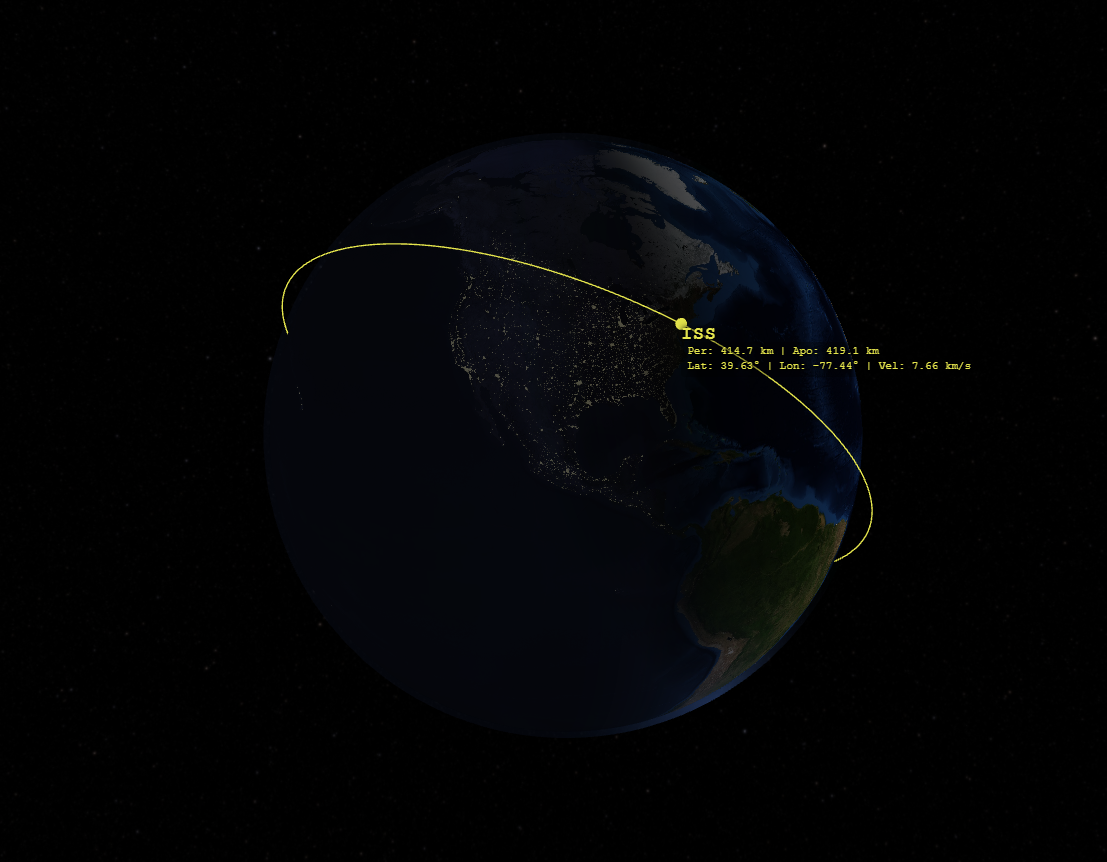
A New Era of Orbital Visualization
The Orbit Visualizer is ExoAtlas's most advanced interactive tool yet, designed for satellite tracking enthusiasts, aerospace engineers, educators, and spaceflight planners. Built entirely with WebGL and running client-side in your browser, this tool offers real-time 3D visualization of orbital mechanics scenarios without the need for heavy desktop software or complex installations.
Core Features
1. Multiple Input Formats
The Orbit Visualizer supports three industry-standard input methods for defining orbital objects:
- Classical Orbital Elements (COE) — Define orbits using semi-major axis, eccentricity, inclination, RAAN, argument of periapsis, and true anomaly.
- State Vectors — Input position and velocity vectors in ECI coordinates for precise trajectory definition.
- Two-Line Element (TLE) Sets — Paste TLE data directly from sources like Space-Track.org or Celestrak for real-world satellite tracking.
2. Real-Time 3D Rendering
Powered by custom WebGL shaders, the visualizer renders:
- A high-resolution textured Earth globe with day/night lighting effects and atmospheric glow.
- Orbital paths for multiple simultaneous objects with color-coded trajectories.
- Sun position visualization with accurate solar vector calculations.
- Coordinate axes for both ECI (Earth-Centered Inertial) and ECEF (Earth-Centered Earth-Fixed) reference frames.
- A starfield background for enhanced spatial awareness.
3. Interactive Time Controls
Control scenario playback with precision:
- Adjustable time step multipliers for slow-motion or fast-forward simulation.
- Play/pause functionality to freeze orbital states for analysis.
- Real-time Earth rotation visualization synchronized with UTC time.
- Scenario epoch management for historical or future orbital predictions.
4. Advanced Orbital Mechanics
The visualizer includes sophisticated orbital calculation capabilities:
- Classical Orbital Element (COE) conversions — Convert between state vectors and Keplerian elements.
- Orbital propagation — Compute future satellite positions using gravitational models.
- Lambert transfer planning — Calculate optimal trajectory transfers between two orbital positions.
- SGP4 propagation — Accurate TLE-based orbit prediction using the Simplified General Perturbations model.
5. Multi-Object Scenario Support
Visualize complex multi-satellite scenarios:
- Add unlimited orbital objects to a single scenario.
- Assign unique colors to each object for easy identification.
- Display object labels and real-time orbital data overlays.
- Manage individual object visibility and trajectory rendering.
6. Camera and Reference Frame Controls
Explore orbital scenarios from any perspective:
- Interactive camera rotation with mouse controls (click + drag).
- Zoom in/out using scroll wheel for detailed inspection.
- Toggle between ECI and ECEF reference frames for different analysis needs.
- Customizable display options for axes, labels, and sun vector visibility.
Technical Implementation
The Orbit Visualizer represents a significant engineering achievement, combining:
- Custom WebGL shaders for high-performance 3D graphics rendering.
- Client-side orbital mechanics calculations — all propagation happens in your browser, ensuring data privacy and eliminating server dependencies.
- Integration with ExoAtlas Data API — fetch real-time planetary ephemeris data from
data.exoatlas.com. - Responsive design with fullscreen mode for immersive visualization experiences.
The entire application runs locally after initial load, making it fast, efficient, and accessible even with limited internet connectivity.
Use Cases
The Orbit Visualizer is designed for:
- Satellite tracking — Visualize real-world satellite orbits using TLE data from tracking networks.
- Mission planning — Design and analyze spaceflight trajectories for orbital transfers and rendezvous scenarios.
- Education — Teach orbital mechanics concepts with interactive 3D demonstrations.
- Research — Prototype orbital scenarios and validate analytical calculations visually.
- Aerospace engineering — Explore complex multi-body orbital dynamics and reference frame transformations.
Getting Started
The Orbit Visualizer is available now at exoatlas.com/tools/orbit-visualizer.
To start visualizing orbits:
- Select an input format (COE, State Vectors, or TLE).
- Enter orbital parameters or paste TLE data.
- Click "Add Object" to render the orbit in 3D.
- Use time controls to simulate orbital motion.
- Explore different camera angles and reference frames.
What's Next
Future updates to the Orbit Visualizer will include:
- Groundtrack visualization — Display satellite ground paths on Earth's surface.
- Orbit comparison tools — Analyze differences between multiple orbital scenarios side-by-side.
- Export capabilities — Save scenarios, orbital data, and rendered visualizations for offline analysis.
- Enhanced perturbation models — Include atmospheric drag, solar radiation pressure, and J2 oblateness effects.
- Pre-configured satellite catalog — Quick-load popular satellite orbits from a built-in database.
The ExoAtlas Orbit Visualizer brings professional-grade orbital mechanics analysis to the web — accessible, powerful, and free to use. Start exploring satellite orbits today and experience spaceflight trajectory planning like never before.